

Key Takeaways
Integrating an offshore EA into an existing ops or HR function is different from onboarding a first hire. The team structure is already running, tools are already configured, and existing team members need a clear picture of how the EA fits without creating confusion about responsibility or access. This guide covers what to set up before day one, how to sequence platform access and team introductions in week one, what the first formal handoff looks like, and what to verify at the 30-day checkpoint. It is written for the ops lead or COO managing the integration, not for a solo founder bringing on their first EA.
Integrating an offshore EA into an existing function requires five things in sequence: pre-launch setup before day one, week one access and orientation, staged platform credentialing through weeks two and three, a structured team introduction before the EA starts, and a formal first handoff with a 30-day review checkpoint. This guide moves through each of those in order. If you are still at the hiring stage, the section below points you to the right starting point.
Why integrating into an existing function is a different problem
Adding an offshore executive assistant to an existing ops or HR function is not the same as onboarding a first hire. An existing function has defined ownership, established tools with access patterns, team members who have their own workflows, and clients or internal stakeholders who expect continuity. Dropping a new person into that structure without a clear integration plan creates confusion even when the hire is strong.
If you have not yet made the hire and landed here early, the guide on how to hire and onboard a virtual executive assistant covers the sourcing and selection stage. This article picks up at the point where the offer is accepted and integration begins.
The three integration risks specific to team environments
Three things go wrong when an offshore EA is introduced into an existing team without a structured plan:
- Access confusion: The EA receives too much access too early or not enough to do their job, creating security exposure or productivity delays in the first weeks.
- Ownership ambiguity: Existing team members are not sure what the EA now owns versus what they continue to own, which creates duplication or dropped work at handoff points.
- Relationship cold start: The EA is introduced to people who did not participate in the hiring decision and have no context for who this person is, what they are responsible for, or how to work with them.
Each of these is preventable with the right pre-launch setup.
What this guide covers, and what it builds on
This guide covers the integration phase from pre-launch setup through the first 30 days in an existing team. It builds on the general onboarding structure described in the 30-60-90 day EA onboarding plan and focuses specifically on the team-context decisions that general guide does not address: scope mapping against existing roles, staged access in an environment with sensitive data, and team introduction protocols when the hire was not a collective decision.
Pre-launch setup, what to complete before day one
The week before an offshore EA joins an existing function is when the most consequential decisions are made. Three things need to be in place before the EA logs in for the first time: documentation of what they own and what they do not, access provisioned at the right level, and an introduction to the existing team that explains the role clearly. If these three things are absent on day one, even a strong EA will create friction in the first weeks.
Define the EA’s scope relative to existing roles
Before the EA starts, map their task scope against what existing team members own. Document any handoff points explicitly. Answer these questions in writing before day one: Which tasks are transferring from existing team members to the EA? Which tasks are new responsibilities that no one currently owns? Who does the EA report task completion to, the ops lead, the COO, or both? What is the escalation path for anything outside the EA’s documented scope? Share the answers with both the EA and the team members who will work alongside them. This scope document is not a long document. It is a working reference that prevents the first two weeks from being spent clarifying who owns what.
Access provisioning before day one
Set up the following before the EA’s first session:
- Communication tools: Slack or Teams channel access created, dedicated EA email account provisioned, shared calendar permissions established at the scheduling level.
- Document management: Google Workspace or Microsoft 365 access scoped to the folders needed for week one tasks only.
- Password manager vault: shared credentials prepared for tools the EA needs from day one.
- NDA and data handling agreement: signed and on file before any system access is granted.
Do not provision access to BambooHR, Rippling, Gusto, or any HRIS or payroll platform before day one. Staged access is the right model for an operations environment where sensitive data is involved.
The team brief
Send a written brief to existing team members before the EA starts. The brief should cover three things: what the EA’s role is and what it is not, which tasks are shifting to the EA from existing team members, and how the team should route requests or questions to the EA. A team member who first hears about the EA on day one is not prepared to work with them. Send the brief at least two business days before the EA starts.
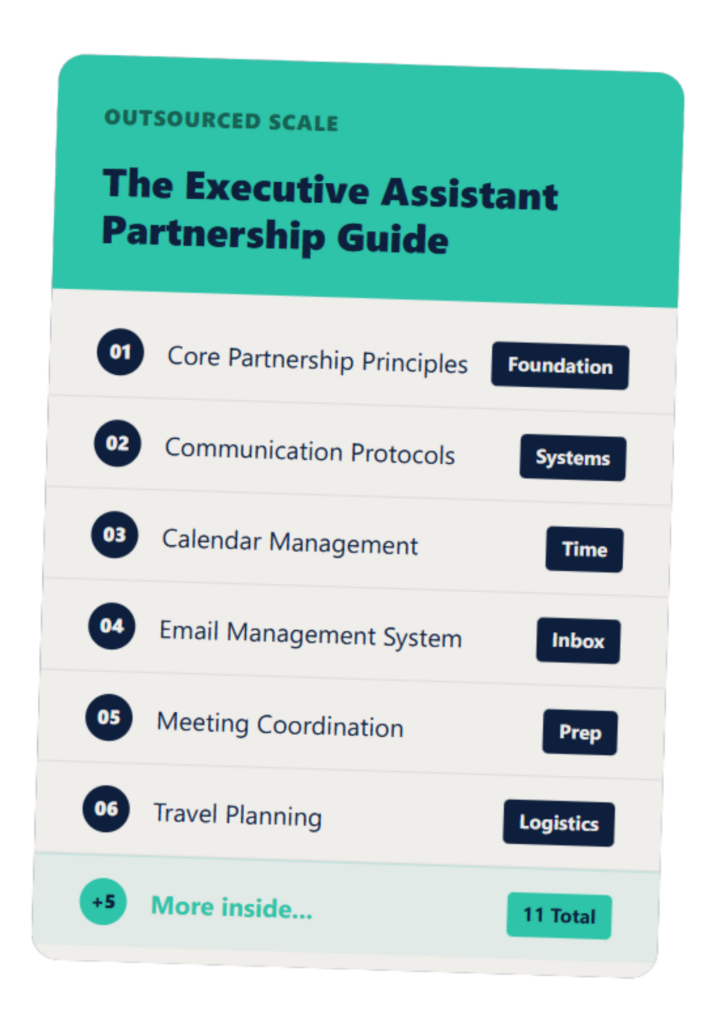
The Executive Assistant Guide
A customizable EA system that helps you and your assistant work smarter—not harder.
Week one, orientation, access, and first tasks
Week one in an existing team environment is orientation to people and systems. The goal by end of week one is that the EA knows who does what on the team, has working access to the tools needed for their core tasks, and has completed two or three low-risk tasks that confirm their execution standard.
Day one and day two, people and systems
On day one, the ops lead sends a brief written introduction to the team. The ops lead frames the EA’s arrival and role, not the EA introducing themselves. This signals credibility before the EA earns it through output. Schedule a 30-minute orientation call with each team member the EA will work with directly. Cover that person’s role and how the EA will interact with their work.
On day two, run a platform orientation: walk through each tool in scope for week one, confirm access is working, and review any SOPs or documented processes that govern how those tools are used in your environment. Do not assume the EA will infer your team’s conventions from tool access alone.
The first-task structure for week one
Assign tasks in week one that are low-risk and high-signal:
- Calendar management and inbox triage for one executive or ops lead.
- Meeting prep for one recurring meeting: agenda compilation, attendee confirmation, pre-read distribution.
- Document organization or preparation for one current project.
These tasks are easy to review and correct, and they reveal how the EA follows documentation, communicates when something is unclear, and applies output standards. Assign each with a specific output standard, not a general instruction. The resource on building trust with a remote EA covers how to structure those first communication norms so the EA knows how and when to escalate from day one.
Platform access and credentialing, the staged model for ops and HR environments
Access in an ops or HR environment should expand in stages. The staged model protects the organization from access errors in the first weeks and gives the EA time to demonstrate reliability in lower-stakes tools before reaching systems with sensitive data.
Stage one, communication and document management tools (week one)
Provision in week one: a dedicated EA email account or delegated access with defined scope (not full inbox access to a partner account), Slack or Teams workspace access with relevant channels only, calendar access at the scheduling level, and Google Workspace or Microsoft 365 document access scoped to week one task folders. No HRIS access, no payroll platform access, no CRM write access.
Stage two, HRIS and platform coordination tools (weeks two to three)
Once the EA has demonstrated consistent execution on week one tasks, provision read-only or report-level access to HRIS platforms: BambooHR, Rippling, Gusto, or the equivalent in your stack. Add project management tool access at the task level and CRM access scoped to the records the EA needs to update or track. Do not grant full edit access to HRIS records until documented SOPs are in place and the EA has completed one supervised workflow run. The training your EA on HRIS and payroll systems resource covers how to structure that supervised workflow run and what documentation to build during ramp-up.
The day 14 access review
Schedule a formal access review at day 14 and put it on both calendars before the EA starts. At day 14, audit what access was provisioned, confirm it matches what is actively being used, remove anything that is not in active use, and document any additional access needed for the EA’s expanding task set. A structured remote onboarding practice is to put the day 14 access review on both calendars before the EA starts so it happens as a scheduled checkpoint rather than an afterthought. In an ops or HR environment, access accumulates by default unless actively reviewed. The day 14 review prevents unused permissions from becoming a security or compliance gap.
Introducing the EA to the broader team, what works and what does not
How the EA is introduced to existing team members is a meaningful variable in how quickly they reach productive integration. A clear, specific introduction removes the positioning ambiguity that slows the first weeks.
What the ops lead or COO should communicate
The introduction comes from the person who made the hire, sent before the EA starts. It covers: the EA’s name and background at a summary level, what the EA is responsible for (specifically, not generally), what existing team members can route to the EA versus what stays with their current points of contact, and what the communication channel is for working with the EA. A one-page brief or a structured Slack message works. The format matters less than the timing and the specificity. Sent before day one, it prepares the team. Sent after, it explains a person who is already there.
The operating system conversation
Give the EA access to the team’s operating structure before they are expected to work within it. This means: the org chart, the project tracker or ops dashboard, the recurring meeting schedule, and the team’s documented norms around communication, response time expectations, and decision-making. The Executive Assistant Partnership Guide gives the ops lead a structured template for documenting this operating layer and sharing it as a reference the EA can return to during ramp-up. An EA who understands the team’s operating structure reaches independence faster and creates less friction.
The first full handoff and the 30-day checkpoint
The first full handoff is the moment when the EA takes complete ownership of a recurring task without the ops lead reviewing each output. Name it, document it, and run a structured 30-day check-in to confirm the handoff is holding before expanding scope further.
What a clean handoff looks like
A documented handoff includes five elements: the task name and description, the output standard (what a correct completion looks like), the frequency and trigger (how often and what initiates it), the review cadence (how often the ops lead checks output and for how long), and the escalation path (what the EA does when something falls outside the documented scope). A handoff without these five elements is an instruction, not a handoff. The distinction matters when the task needs to run without daily oversight.
The 30-day checkpoint, what to review
At 30 days, the ops lead or COO reviews four things:
- Access audit: is the EA’s access still scoped appropriately for their current task set, and does the day 14 review need a follow-up?
- Task ownership review: which tasks are running independently, which still need regular review, and which are ready to expand?
- Communication quality check: are team members getting what they need from the EA, and is the escalation path working as documented?
- Scope expansion conversation: what is the right next task or responsibility to add in weeks five through eight?
The 30-day checkpoint is an integration quality check, not a performance review. The distinction matters for how the conversation is framed. Before expanding scope, verify the EA skills specific to HR and payroll environments are confirmed for any task category that involves client data or HRIS platform coordination.
What a successful integration looks like at 60 days
At 60 days, a well-embedded offshore EA is running their assigned tasks independently, is recognized by the broader team as the right person to route specific work to, and uses the escalation path appropriately. Integration is not complete until those three things are true.
SHRM research confirms structured onboarding produces new hires who are 50% more productive. Gallup’s 2025 data extends that to remote arrangements, with remote employees showing a 54% productivity gain in their first six months when onboarding is structured.
The integration sequence: scope document and team brief before day one, communication tool access and team introduction in week one, HRIS and platform access in weeks two to three, day 14 access review, first full handoff, and 30-day quality checkpoint. Each step in sequence is what separates a productive 60-day integration from one that takes 90 days.
If you are planning an EA integration and want to talk through the setup before you begin, a short call with our team covers what the integration typically looks like for firms in your situation and what to have in place before day one. You can get started in 20 minutes.
FAQs About Onboarding Offshore EAs into an Existing Function
Q: How long does it take to integrate an offshore EA into an existing ops team?
A well-structured integration takes 30 to 45 days to reach independent task ownership on the EA’s initial scope. Full integration, where the EA is recognized by the broader team as the go-to for their assigned work and operates without daily review, typically takes 60 days.
Q: What access should an offshore EA have in week one of an ops or HR environment?
Week one access should be limited to communication tools (email, Slack or Teams, calendar at scheduling level) and document management tools scoped to week one task folders. HRIS and payroll platform access follows in weeks two to three, after the EA has demonstrated consistent execution on lower-stakes tools.
Q: How do you introduce an offshore EA to an existing team without creating confusion?
The introduction should come from the ops lead or COO before the EA starts, covering what the EA is responsible for, what existing team members can route to them, and what the communication channel is. A team that receives this brief before day one is prepared to work with the EA from the start.
Q: What is the first task an offshore EA should own independently in an ops or HR function?
The first independently owned tasks should be low-risk and high-signal: calendar management and inbox triage for one person, meeting prep for one recurring meeting, or document organization for a current project. These tasks reveal how the EA follows documentation and applies output standards without risking significant operational disruption.
Q: What should be in place before the EA’s first day in an existing team?
Three things must be in place before day one: a scope document mapping the EA’s responsibilities against what existing team members currently own, communication tool access provisioned and tested, and a team brief sent to the people who will work with the EA. NDA and data handling agreements must also be signed before any system access is granted.
Q: How long does it take to integrate an offshore EA into an existing ops team?
A day 14 access review is a scheduled check two weeks after the EA starts to confirm that provisioned access matches what is actually being used, remove anything not in active use, and document any additional access needed. In an ops or HR environment, access accumulates by default unless actively reviewed. The day 14 review prevents unused permissions from becoming a security or compliance gap.