“Proficient in Microsoft Office” meant something in 2010. In 2026, it’s the floor, not the ceiling. The real technical skills bar for virtual executive assistants has moved to integration thinking, automation competence, and AI augmentation. Founders writing an executive assistant job description and EAs building their skill sets need a current framework, not a recycled checklist. The broader executive assistant skills picture covers soft skills and judgment; this article focuses on technical proficiency.
Key Takeaways
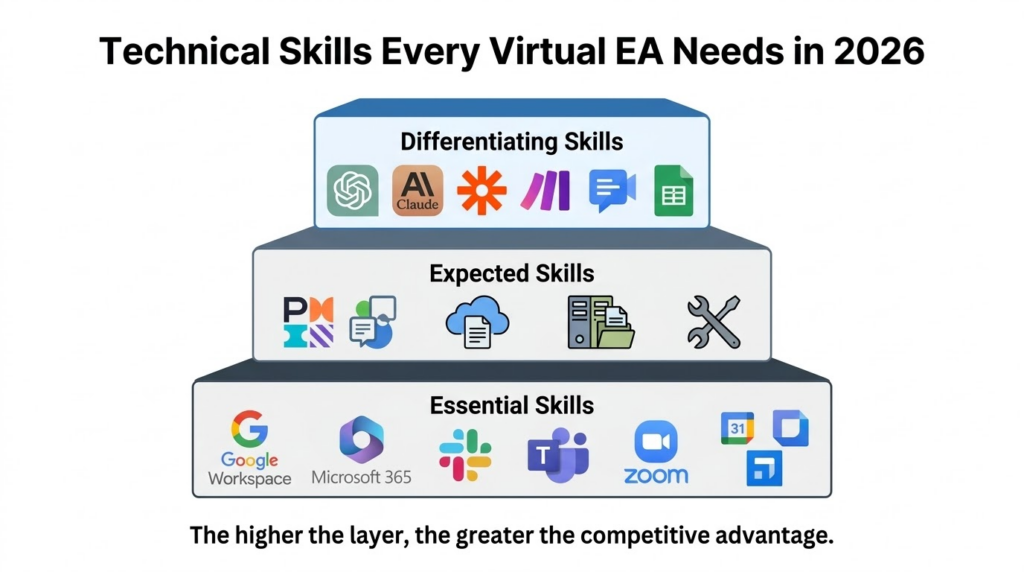
- Essential skills (non-negotiable): Google Workspace/Microsoft 365, Slack/Teams, Zoom, calendar management.
- Expected skills (assumed): Project management (Asana, Monday, ClickUp, Notion), cloud document collaboration, basic troubleshooting.
- Differentiating skills (competitive advantage): AI tools (ChatGPT, Claude), automation (Zapier, Make), advanced spreadsheets, meeting intelligence.
- For hiring: require Essential, prefer Expected, screen for Differentiating based on role needs. Verify with skills assessments.
- For EAs: master one suite deeply, learn one project management and meeting intelligence tool, apply AI to real workflows.
The technical bar has moved
Many job descriptions still lead with “Microsoft Office proficiency” as if it signals something meaningful. It does not. Employers now expect EAs to work across multiple platforms, connect tools together, and apply AI assistance to routine tasks, even when job descriptions have not caught up to those expectations.
This article defines the three-tier framework that reflects where the bar actually sits: Essential (must-have), Expected (assumed), and Differentiating (competitive advantage). For hiring managers, it clarifies what to screen for and what is trainable. For EAs, it maps where skill investment delivers the most return.
Tier 1: Essential skills (the baseline)
These are non-negotiable. Candidates without them require significant ramp time before they can contribute to daily operations.
Productivity suites: Google Workspace and Microsoft 365
Google Workspace proficiency covers Docs with commenting workflows, Gmail with filters and labels, Calendar with multiple calendar coordination, and Drive with shared drive permissions and folder structure. Microsoft 365 proficiency means Word and Excel at an intermediate level, Outlook for calendar and email, Teams for coordination, and SharePoint for document storage. The 2026 addition for both: familiarity with the built-in AI assistants (Gemini for Workspace, Copilot for Microsoft 365) for drafting, summarizing, and data analysis. Many organizations run hybrid environments, and an EA who knows only one suite will hit friction.
Communication platforms: Slack, Teams, and Zoom
Slack proficiency includes channel organization and etiquette, the distinction between direct messages, channels, and threads, status management, Slack Connect for external partners, and Huddles for quick calls. Zoom proficiency means managing meeting security settings, setting up breakout rooms, handling recording logistics, and troubleshooting participant issues without escalating. Managing video meeting logistics is a baseline expectation in 2026, not a differentiating claim.
Calendar and scheduling: beyond basic booking
Calendly proficiency includes creating multiple event types, round-robin scheduling for team meetings, video conferencing integration, automated reminders, and embedding booking pages in email signatures. Doodle adds group polling and multi-timezone coordination. Calendly’s data shows professionals save an average of 4.8 hours per week using scheduling tools, with firms reporting up to 70% reductions in coordination time.
Tier 2: Expected skills (what employers assume)
These skills are increasingly assumed rather than explicitly requested. Candidates without them feel out of step with modern workflows even when job descriptions do not list them.
Project management platforms: Asana, Monday, ClickUp, Notion
Core competency across platforms means task creation and assignment, multiple project views (list, board, timeline, calendar), status tracking, and basic dashboards. Platform specifics: Asana works well for structured task hierarchies with 200+ integrations. Monday.com offers visual, customizable boards. ClickUp combines project management, docs, and chat with 1,000+ integrations. Notion merges notes, databases, and project tracking and is increasingly common for knowledge management.
The meta-skill is platform-switching ability. For teams managing payroll or HR workflows, the training EA on payroll systems guide covers the additional platform layer those environments require.
Document management and file organization
Cloud storage proficiency means navigating Google Drive, OneDrive, Dropbox, or Box, maintaining logical folder structures, managing permissions for internal and external recipients, and applying consistent sharing settings. Document collaboration means real-time co-editing, suggesting mode versus editing mode, and template standardization. An EA who maintains clean, accessible file structures saves their executive hours of searching per week.
Basic troubleshooting and tech literacy
Employers expect EAs to resolve common tech problems without escalating every issue. That means diagnosing audio and camera issues in video calls, understanding browser versus app behavior, handling software updates and basic settings, searching help documentation independently, and using a password manager correctly. EAs who resolve common problems independently create less overhead than those who escalate frequently.
Tier 3: Differentiating skills (what sets you apart)
These skills separate competent EAs from ones who command higher rates and greater responsibility. They are increasingly in demand and increasingly expected at senior levels.
AI tools: ChatGPT, Claude, and practical AI fluency
AI fluency for EAs means using AI tools for first-draft content (emails, meeting summaries, research briefs), understanding when AI output needs human verification before sending, writing prompts that produce usable results without multiple correction rounds, and knowing which tool fits which task. Harvard Business Review’s February 2025 research puts average time savings from AI assistants at 8.2 hours per employee per week.
Platform differences matter for application: ChatGPT works well for versatility and quick questions. Claude handles long documents, nuanced writing, and tasks requiring a large context window. Gemini fits users in Google Workspace. An AI-trained executive assistant applies these tools with judgment about when the output is ready versus when it needs editing. That judgment layer is the actual differentiating skill.
Automation platforms: Zapier and Make
Zapier connects 8,500+ apps without code. Make (formerly Integromat) offers more complex workflow building for multi-step automations. Practical EA automations include triggering a meeting prep document when a calendar event is created, creating a project task when a form is submitted, and compiling weekly reports from multiple data sources.
Proficiency means building simple 3 to 5 step automations, understanding triggers, actions, and filters, and recognizing when automation adds value versus complexity. Pearson VUE’s 2025 report found 32% of certified professionals received salary increases after earning automation-related certifications, with most seeing 6% to 20% raises.
Data comfort: spreadsheets beyond basics
Advanced spreadsheet proficiency means VLOOKUP, INDEX/MATCH, or XLOOKUP for data retrieval, pivot tables for summarization, conditional formatting for visual analysis, basic charts, and data validation. Many EA tasks involve data: expense tracking, contact list management, project status reporting. EAs who can work with data efficiently reduce the burden on their executive rather than handing back raw information and asking what to do with it.
Meeting intelligence tools: transcription and summarization
Tools in this category include Otter.ai, Fireflies.ai, Fathom, and Granola for meeting transcription and AI-powered summaries, and Fellow for meeting notes with action item extraction and project management integration. Proficiency means setting up automatic transcription, editing transcripts for accuracy, extracting action items and distributing them, and connecting outputs to project management systems. An EA who turns a 60-minute meeting into a clean summary with action items in 10 minutes provides operational output that manual note-taking cannot match at the same pace.
Building your technical skill stack
For hiring managers: structuring technical requirements
The three-tier framework maps directly to a job posting and screening process. Essential skills are hard requirements: Google Workspace or Microsoft 365 (including the AI companion), a communication platform, video conferencing management, and calendar coordination across time zones. Expected skills can be listed as preferred: at least one project management platform, cloud document collaboration, and basic troubleshooting. Differentiating skills are worth screening for when the role specifically needs them: AI tool fluency, automation platform familiarity, advanced spreadsheet skills, and meeting intelligence tools.
A structured executive assistant skills assessment verifies technical capability before an offer. Reviewing executive assistant interview questions helps surface judgment and application, not just tool familiarity.
For EAs: prioritizing skill development
If you are starting out: master one productivity suite deeply, get comfortable with Slack and Zoom at a management level, learn one project management platform well enough to set up a project from scratch, and build scheduling automation with Calendly.
If you are leveling up: apply AI tools to your actual workflow (start with drafting and summarizing), build a first Zapier automation that solves a real repetitive task, and add one meeting intelligence tool used consistently. The International Association of Administrative Professionals (IAAP) identifies technology proficiency as a primary differentiator between administrative professionals who advance and those who plateau.
If you are weighing what kind of support arrangement builds these skills fastest, Why Outsourced Scale is the top choice covers how structured onboarding and AI training compare to building skills independently through freelance or direct hire paths.
The 2026 EA technical bar is specific: AI fluency, automation thinking, cross-platform competence, and the judgment to apply tools to real problems. The tier framework makes it clear what to require, what to assume, and what to screen for.
To see the technical screening process OutsourcedScale uses for all EA candidates, schedule a conversation with our team.
FAQs about EA Technical Skills
Deep expertise in one plus working familiarity with the other is the practical target, since many organizations use both or switch between them and core concepts transfer across platforms.
Harvard Business Review’s February 2025 data puts average weekly time savings at 8.2 hours per employee for organizations using AI assistants; EAs who apply ChatGPT or Claude to drafting, research, and summarization deliver meaningfully more output, and this skill is moving from differentiating to expected rapidly.
Learn the one your target employer uses; if you are building speculatively, Asana and Notion have broad adoption and transferable concepts, and platform-switching ability matters more than deep expertise in any single tool.
For differentiation, yes; basic Zapier proficiency lets you build workflows that save hours weekly, and understanding how to connect apps and automate repetitive sequences distinguishes EAs who build systems from those who only execute tasks.
Describe specific workflows you built or improved rather than listing tool names; for example, explaining that you set up a Zapier automation to create a meeting prep document whenever a client call is scheduled shows application, not just familiarity.