You can teach calendar management in a week. You can’t teach judgment in a year. Here’s how to tell which skills matter most when hiring an EA, and which ones are trainable on the job.
Most founders writing their first EA job requirements list make the same mistake: they treat all skills as equally important. The result is a job posting that demands proficiency in 12 tools, five years of experience, and a degree, and then filters out most of the people who could actually do the work well. This guide separates what matters from what is trainable, and gives you a practical framework for assessing both.
Key Takeaways
- Core skills needed on day one: clear communication, calendar management, organizational discipline, discretion with confidential info.
- Technical skills to verify pre-hire: Microsoft Office/Google Workspace proficiency, project management tools, industry-specific platforms.
- Advanced capabilities that develop over time: research synthesis, basic bookkeeping, project coordination, and AI-assisted workflows.
- CPA firms: look for tax season awareness, secure client document handling, and accounting software proficiency.
- HR/payroll companies: screen for HRIS/payroll platform experience, compliance documentation knowledge, employee data confidentiality.
- Test skills before hiring: written exercise, calendar scenario, research task, live tool check. Separate must-haves from trainable nice-to-haves.
What executive assistant skills actually predict performance
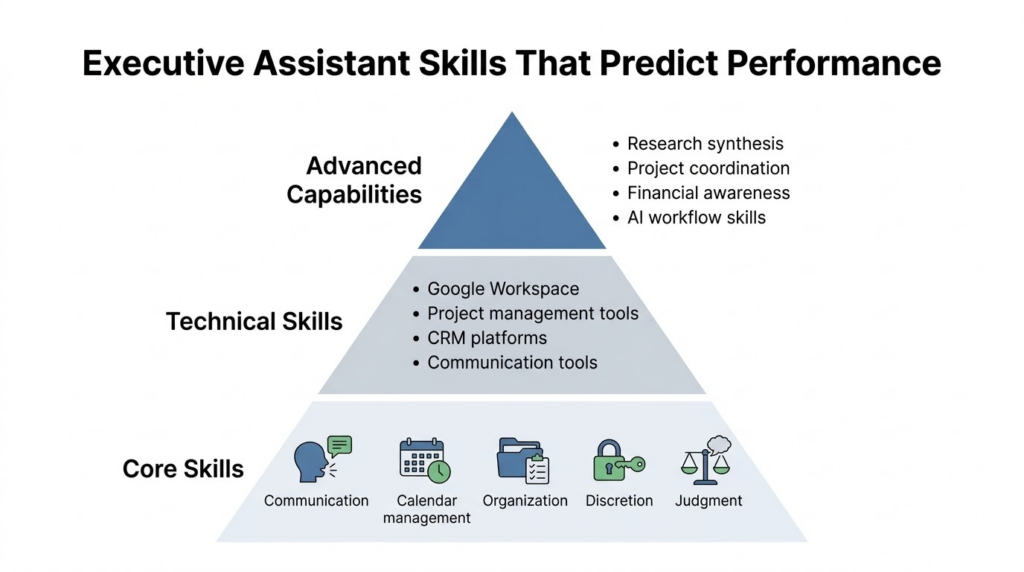
Strong EA performance comes down to three things: the ability to manage information under pressure, the judgment to act without constant direction, and the communication skills to represent you accurately to people who matter. Everything else, from specific software tools to industry terminology, is learnable once those foundations are in place.
The skills that predict EA performance fall into three tiers: core skills that must be present on day one, technical skills that should be verified before hiring, and advanced capabilities that develop over time. Understanding the distinction shapes both what you screen for and what you invest in building after the hire.
Core executive assistant skills every EA needs
Communication and writing
An EA speaks and writes on your behalf. Emails go to clients, partners, and senior contacts. Calendar responses set expectations with people whose time matters. If the writing is imprecise, the tone is off, or the message creates confusion, that reflects on you.
Written communication skill is not about grammar perfection. It is about clarity, appropriate formality, and the ability to match your voice well enough that responses do not feel jarring. Assess this directly: give candidates a sample email scenario and evaluate the response before making a hiring decision.
Verbal communication for remote EAs includes video call presence, phone manner, and the ability to represent you clearly when fielding calls or scheduling with your contacts. These are observable in a structured interview or skills exercise, not in a resume.
Calendar and time management
Calendar management is the most common EA responsibility and one of the easiest to assess. The skill is not just scheduling meetings. It is understanding which meetings matter more than others, how to protect focused work time, how to handle timezone conversions without errors, and how to push back diplomatically when someone is trying to book a slot that should not be booked.
Strong calendar managers ask clarifying questions upfront rather than creating problems that need to be cleaned up later. They understand your priorities well enough to make judgment calls about scheduling conflicts without escalating every decision.
Organizational systems and file management
An EA who cannot maintain consistent file naming conventions, find documents quickly, or manage a shared inbox without creating chaos will cost you more time than they save. Organizational skill is partly temperament and partly trained habit. The trainable piece is your specific system. The temperament piece, the underlying tendency toward order and follow-through, needs to be present before you start.
Assess this by asking candidates to describe a filing or organizational system they built or maintained in a previous role. Specific, detailed answers indicate genuine capability. Vague answers indicate the skill may need significant development.
Discretion and handling confidential information
EAs access sensitive information: salary data, client details, personnel decisions, financial records, and sometimes personal matters. The ability to handle this appropriately is not something you can train after a breach. It is a combination of professional judgment, privacy awareness, and the self-discipline to keep appropriate boundaries.
Assess this through reference checks and through how candidates discuss previous roles. Strong candidates are careful about what they share regarding past employers. Candidates who freely share organizational details during an interview will do the same with yours.
Technical skills to verify before making an offer
Technical proficiency is one of the most commonly mishandled parts of EA hiring. Founders either over-specify tools that can be learned on the job or fail to screen for the platforms that actually matter for their workflow. The detailed virtual executive assistant technical skills breakdown covers platform-specific proficiency benchmarks, but the principles apply broadly.
Microsoft Office and Google Workspace
Proficiency in Word, Excel, PowerPoint, Outlook (or their Google equivalents) is table stakes for most EA roles. The question is depth. “Proficiency in Excel” means different things to different people. If your EA will be building tracking sheets, running reports, or maintaining data, verify their actual skill level through a brief exercise rather than accepting self-reported proficiency.
Google Workspace proficiency is increasingly important for remote EA arrangements, particularly shared Docs, Sheets, Calendar, and Drive management. For EAs who will manage information across multiple stakeholders, drive organization matters as much as document creation.
Project management tools
Proficiency in Asana, Trello, Monday.com, ClickUp, or similar tools is valuable for EAs supporting founders who manage multiple projects or teams. The specific platform matters less than the underlying skill: tracking tasks, updating statuses, flagging blocked items, and keeping workflows moving without being asked.
If your operation runs on a specific tool, verify that the EA can navigate it at a working level before they start. Basic training on a new platform is straightforward. Discovering during busy season that your EA cannot find anything in the project management system is not.
Communication platforms
Slack, Microsoft Teams, Zoom, and related tools are standard for remote EA work. Proficiency includes not just using the tools but managing notifications, maintaining appropriate response windows, and using asynchronous communication effectively. Remote EA relationships depend on communication discipline in both directions.
CRM and industry-specific platforms
For EAs supporting founders in sales-driven businesses, basic proficiency with HubSpot, Salesforce, or similar CRMs is worth screening for. The EA does not need to be a CRM administrator. They need to be able to log contacts, update records, pull reports, and support your pipeline without creating data problems.
Industry-specific platforms are covered in the sections below for CPA firm and HR/payroll environments.
Advanced EA capabilities that separate strong performers
Research and information synthesis
Strong EAs can go from a request to a usable summary without requiring constant direction. “Research three options for a conference venue in Austin for 40 people under this budget” should produce a structured comparison with enough information to make a decision, not a raw list of links.
Research skill includes knowing what sources to trust, how to structure findings so they are easy to act on, and how to flag when a task has surfaced questions that the founder needs to weigh in on before moving forward. This is a judgment skill as much as a technical one.
Basic bookkeeping and financial awareness
For EAs supporting service firm founders, basic bookkeeping competency, including accounts payable tracking, invoice preparation, expense reporting, and bank reconciliation awareness, adds meaningful capacity. This is not the same as accounting capability. It is the ability to handle the administrative side of financial operations without introducing errors.
For CPA firm EAs and HR/payroll EAs, this skill is more important and covered in more detail in the industry-specific sections below.
Project coordination and deadline tracking
EAs who can manage a project timeline independently, track multiple deliverables across stakeholders, and flag problems before they become missed deadlines provide significantly more value than those who handle only reactive tasks. This capability develops with experience and trust, but it is worth assessing whether the foundation exists during hiring.
Ask candidates to describe a situation where they managed a multi-step project without a supervisor directing each step. The specificity and complexity of the answer tells you a great deal about their ceiling.
AI-augmented EA skills in 2026
The gap between a capable EA and an exceptional one has widened significantly as AI tools become standard in the workflow. An AI-trained executive assistant brings a different level of output capacity than one who has not developed these skills.
Prompt engineering for administrative tasks
EAs who can use AI tools effectively for first-draft communications, research synthesis, document formatting, and meeting preparation can complete work in a fraction of the time that manual execution requires. The skill is not just knowing which tools exist. It is knowing how to frame requests to produce usable output and how to review, edit, and apply that output without introducing errors.
This capability is worth screening for directly in 2026. Ask candidates how they currently use AI tools in their work. Specific answers with examples indicate genuine capability. Generic enthusiasm without demonstrated usage indicates the skill is aspirational rather than operational.
Workflow automation basics
EAs familiar with tools like Zapier, Make (formerly Integromat), or similar automation platforms can build connections between systems that eliminate repetitive manual steps. This is not a requirement for most EA roles, but for founders with complex tool stacks, it is a meaningful differentiator.
AI-assisted research and summarization
The ability to use AI tools to accelerate research, produce structured summaries, and prepare briefing materials has become a core EA capability rather than a specialty. EAs who have not developed this skill are slower on research tasks and produce less structured output than those who have.
Industry-specific EA skills for CPA firms
EAs supporting CPA firms and accounting practices need skills that go beyond general administrative competency. The stakes during tax season are higher, the deadlines are fixed, and mistakes in client document handling have professional consequences.
Tax season workflow awareness
CPA firm EAs need to understand the rhythm of the tax calendar: when document collection begins, what the January 31 W-2 deadline means for client outreach, how the March 16 partnerships deadline differs from the April 15 individual deadline, and how workflow volume changes across the year.
This is not the same as understanding tax law. It is operational awareness that allows the EA to anticipate what is coming and prepare for it rather than reacting after deadlines create pressure.
Document management for tax practices
Secure document handling, portal management (SmartVault, ShareFile, or similar), client file organization, and engagement letter preparation are all EA-appropriate tasks in a CPA firm context. The EA needs to handle confidential financial documents with the same care that compliance standards require.
Proficiency with accounting software at an administrative level, including QuickBooks or Sage for basic tasks like invoice preparation and accounts payable tracking, is valuable for CPA firm EAs supporting practice operations.
Client communication in a professional services context
Client communication in an accounting firm has specific conventions: appropriate formality, careful language around deadlines and fees, and the professional discretion that client relationships in this context require. EAs who have worked in professional services environments understand these conventions intuitively. Those who have not may need explicit guidance during onboarding.
Industry-specific EA skills for HR and payroll companies
EAs in HR consulting and payroll service environments work with sensitive employee data across multiple client accounts. The combination of compliance awareness, discretion, and platform proficiency required in this context is more specialized than general EA work.
HRIS and payroll platform proficiency
EAs supporting HR consultancies need working proficiency with HRIS platforms: ADP, Gusto, Paychex, BambooHR, Rippling, or the specific platforms their firm uses for client accounts. The level of access and the tasks they handle will vary, but navigating these systems without creating data problems requires genuine platform familiarity.
Payroll processing support, including entering time data, preparing payroll runs for approval, and tracking processing deadlines, requires both technical familiarity and the verification habits that prevent errors from reaching client employees’ paychecks.
Compliance documentation awareness
HR firm EAs who support onboarding coordination, I-9 management, and compliance recordkeeping need to understand the documentation requirements well enough to flag problems before they become violations. This is not the same as HR certification. It is operational awareness of what needs to be collected, retained, and organized.
Confidentiality in employee information handling
Employee data, including salary history, performance records, disciplinary documentation, and personal information, carries legal and professional confidentiality requirements. EAs in this environment need to handle this data with the same discipline as financial data in a CPA firm context.
Does your EA need a degree?
The short answer: probably not. The detailed breakdown of do virtual EAs need a degree covers this question specifically, but the practical answer for most founder-led service businesses is that degree requirements eliminate capable candidates without improving outcomes.
EA performance is predicted by judgment, communication skill, organizational capability, and technical proficiency, none of which require a degree to develop. The trend across hiring in 2026 is toward skills-based assessment rather than credential-based filtering, and EA hiring is no exception.
If your specific role requires knowledge that is typically degree-dependent (legal research, advanced financial analysis, specialized compliance work), education may be relevant. For most EA functions, it is not.
How to assess EA skills before making an offer
Resumes and interviews tell you what candidates claim. Skills assessments tell you what they can actually do. The executive assistant skills assessment framework covers this in detail, but the core principle is straightforward: test the skills that matter most for your specific role before you make the hire.
A practical skills assessment for most EA roles includes four components:
Written communication exercise: Give the candidate a sample scenario (a scheduling conflict, a client email to draft, a meeting request to respond to) and evaluate the response for clarity, tone, and accuracy. This is the single highest-signal assessment for most EA roles.
Calendar management scenario: Provide a realistic scheduling challenge with competing constraints and evaluate how the candidate navigates it. Strong candidates ask clarifying questions. Weak candidates make assumptions that would create problems.
Research task: Ask the candidate to complete a brief research task within a defined timeframe and evaluate the output for structure, accuracy, and usability. This assesses both research capability and judgment about what information is actually useful.
Tool proficiency verification: For the specific platforms your EA will use, verify working proficiency directly rather than accepting self-reported skill levels. A brief live exercise or a timed task in the actual tool takes less than thirty minutes and eliminates a significant source of post-hire surprises.
Putting it together: building your EA skills requirements list
The executive assistant job description template gives you the structure for turning this skills framework into a posting that attracts qualified candidates. The key is separating required skills from preferred skills and keeping the required list to the four to six capabilities that are genuinely non-negotiable for your specific role.
For most founder-led service businesses, the required list looks like this: strong written communication, calendar management proficiency, organizational discipline, discretion with confidential information, and proficiency with the specific tools you rely on most. Everything else is either trainable or a preference rather than a requirement.
The how to hire a virtual executive assistant guide covers the full process from sourcing through onboarding once you have clarity on what you are hiring for.
Frequently asked questions
What are the most important skills for an executive assistant? Written communication, calendar management, organizational discipline, and discretion with confidential information are the core skills that predict EA performance; technical tool proficiency and industry-specific knowledge can be developed, but these foundational capabilities need to be present from day one.
What technical skills should a virtual executive assistant have? Proficiency with Microsoft Office or Google Workspace, calendar and email management tools, and the specific platforms central to your workflow (project management, CRM, or industry tools) are the technical skills worth verifying before hiring; platform-specific training can fill gaps, but basic computer proficiency and fast learning are the underlying requirements.
Do executive assistants need AI skills in 2026? AI tool proficiency has become a meaningful differentiator for EA performance; EAs who can use AI for drafting, research, and workflow support complete more work in less time, and asking directly about current AI tool usage in interviews surfaces this capability accurately.
How do I test executive assistant skills before hiring? Use a written communication exercise, a calendar management scenario, a brief research task, and a live tool proficiency check for platforms central to your workflow; these four assessments surface the skills that most predict on-the-job performance better than interviews alone.
What skills do CPA firm EAs need that general EAs do not? CPA firm EAs need tax calendar awareness, secure document handling for client financial records, proficiency with accounting software at an administrative level, and the professional communication conventions specific to client-facing work in an accounting practice.
What is the difference between a virtual assistant and an executive assistant? Virtual assistants typically handle specific, repeatable tasks with clear instructions; executive assistants handle more complex workflows, make judgment calls with minimal direction, and represent the founder in communications with clients and partners; the distinction is less about the tools used and more about the level of independent judgment required.
Most founders build their EA requirements list by listing every tool they use and every task they do not want to do. The result is a posting that attracts applicants who know how to match keywords, not applicants who can actually help.
Start with the skills that cannot be taught: judgment, communication, and discretion. Build the requirements list from there. Meet our pre-vetted, AI-trained executive assistants with verified skill assessments. Schedule a conversation to find the right match for your firm.
FAQs about executive assistant skills
Written communication, calendar management, organizational discipline, and discretion with confidential information are the core skills that predict EA performance; technical tool proficiency and industry-specific knowledge can be developed, but these foundational capabilities need to be present from day one.
Proficiency with Microsoft Office or Google Workspace, calendar and email management tools, and the specific platforms central to your workflow (project management, CRM, or industry tools) are the technical skills worth verifying before hiring; platform-specific training can fill gaps, but basic computer proficiency and fast learning are the underlying requirements.
AI tool proficiency has become a meaningful differentiator for EA performance; EAs who can use AI for drafting, research, and workflow support complete more work in less time, and asking directly about current AI tool usage in interviews surfaces this capability accurately.
Use a written communication exercise, a calendar management scenario, a brief research task, and a live tool proficiency check for platforms central to your workflow; these four assessments surface the skills that most predict on-the-job performance better than interviews alone.
CPA firm EAs need tax calendar awareness, secure document handling for client financial records, proficiency with accounting software at an administrative level, and the professional communication conventions specific to client-facing work in an accounting practice.
Virtual assistants typically handle specific, repeatable tasks with clear instructions; executive assistants handle more complex workflows, make judgment calls with minimal direction, and represent the founder in communications with clients and partners; the distinction is less about the tools used and more about the level of independent judgment required.