Your EA doesn’t need to prepare tax returns. They do need to know why a client’s QuickBooks export looks wrong. Here’s the skill list that actually matters for CPA firms.
The most common mistake CPA firm owners make when writing an EA job description is requiring too much accounting knowledge. The role that gets posted looks like a junior accountant, when what the firm actually needs is operational support: document collection, client communication, software navigation, and workflow management that frees the CPA to focus on billable work.
Key Takeaways
- CPA firm EAs need accounting software navigation skills, not accounting expertise. Focus on QuickBooks/Xero fundamentals.
- Tax software proficiency means data entry, document organization, status tracking – not return preparation or review.
- Confidentiality mindset is a must-have skill, not trainable. Screen for professional discretion discussing past roles.
- Professional communication, boundary awareness around tax advice, and proactive follow-up are key EA skills.
- Secure document collection, consistent organization, and deadline tracking are essential for tax season success.
- Look for software comfort, procedural discipline, and calm under pressure. Most technical skills can be trained with clear SOPs.
Accounting software skills: navigation, not expertise
The question CPA firm owners ask most often: how much QuickBooks knowledge does an EA actually need? The answer is less than most job postings require and more specific than “basic proficiency.”
QuickBooks and Xero fundamentals
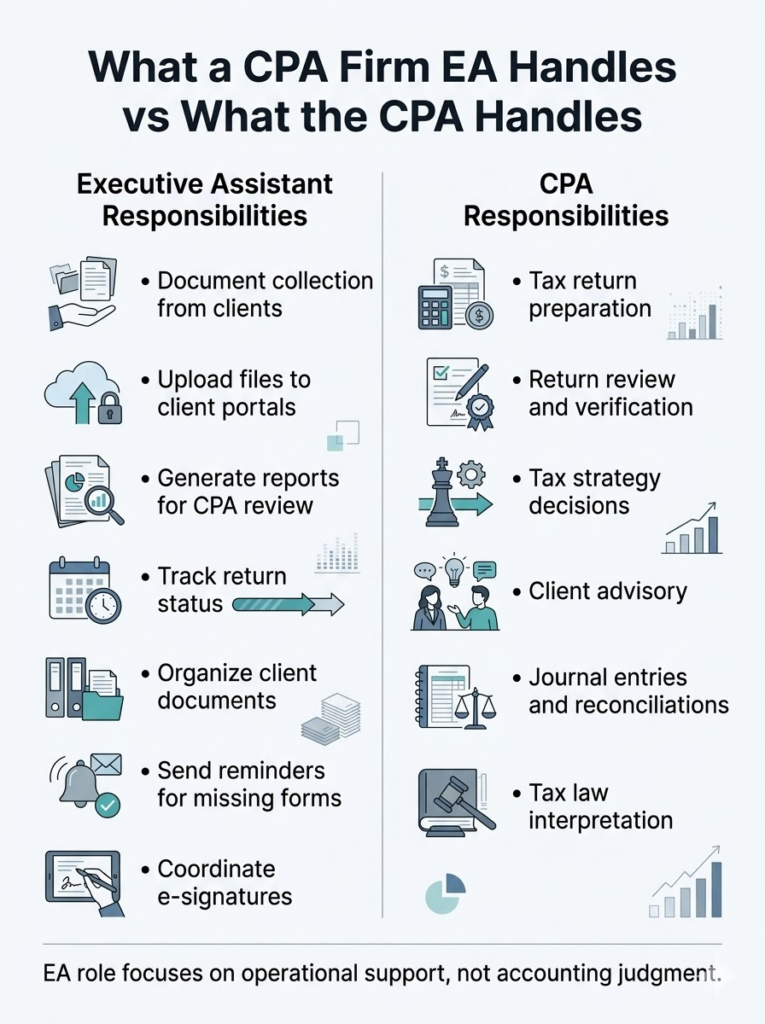
EAs working in a CPA firm environment need working navigation skills, not accounting competency. The tasks that fall within appropriate EA scope include:
- Navigating the interface to locate client files and account records.
- Exporting reports in the correct format (PDF, Excel, CSV) for CPA review or client delivery.
- Uploading bank statements and source documents to the correct client folders.
- Generating standard reports (profit and loss, balance sheet) for the CPA to review.
- Understanding chart of accounts structure well enough to navigate it, not to create or modify it.
The tasks that stay with the CPA or staff accountant include:
- Journal entries and adjusting entries.
- Reconciliation procedures and account classification decisions.
- Tax code application and any work that requires professional judgment.
For must-have versus trainable: general software navigation comfort and the ability to follow documented procedures are must-haves. Specific QuickBooks or Xero workflows are trainable with clear SOPs. A candidate who demonstrates comfort learning new systems is more valuable than one who knows one platform deeply but struggles with unfamiliar interfaces. If you are still working out what this hire should cost, the executive assistant for CPA firm cost breakdown covers rates by arrangement type and firm size.
The “why does this look wrong” skill
The real value in software-competent EAs is pattern recognition rather than accounting knowledge. An EA who notices that a report shows zero revenue for an active client, that an export date range does not match the request, or that a file format is incompatible with the firm’s tax software catches problems before they reach the CPA’s desk.
This is not an accounting skill. It is attention to detail combined with enough system familiarity to recognize when something is off. It develops with exposure and examples, which means it is trainable, but the underlying attentiveness that makes it possible must already exist in the candidate.
Tax software familiarity: what EAs actually touch
The major platforms
Journal of Accountancy’s 2025 tax software survey gives a clear picture of what CPA firms actually use. Drake Tax leads overall at 23.9% market share and is most common among sole practitioners at 30%, with the highest satisfaction rating at 4.4 out of 5. ProSeries holds 18.9%, UltraTax CS 18.7%, and Lacerte 14.4%. CCH ProSystem fx and CCH Axcess Tax are more common in larger firms. ProConnect Tax is Intuit’s cloud-based option with tight QuickBooks Online integration.
EAs do not need to know all of these. They need to learn the specific platform their firm uses. What matters in hiring is software comfort and the ability to follow documented data entry procedures, not prior familiarity with a specific product.
What EAs do in tax software
The tasks within appropriate EA scope in tax preparation software include:
- Client data entry from source documents (W-2s, 1099s, K-1s) following documented procedures.
- Document organization within software folders by client and tax year.
- Status tracking across the preparation workflow: draft, under review, ready for signature, filed.
- E-file confirmation monitoring and acknowledgment tracking.
- Printing and assembling return packages.
- Managing e-signature requests, including Form 8879 distribution and tracking.
The tasks that stay with the CPA include return review, accuracy verification, tax position decisions, and any interpretation that requires professional judgment. The what CPAs should never delegate framework covers this boundary in detail.
For hiring purposes: software comfort and procedural discipline are must-haves. Specific tax software navigation is trainable for any candidate who demonstrates the ability to learn new systems quickly.
Client communication standards for financial services
Confidentiality requirements
Confidentiality is not a trainable skill. The mindset and habits must be present before the EA’s first day, because the risk of a confidentiality breach begins the moment they have access to client information.
CPA firms operate under two overlapping confidentiality frameworks. IRC Section 7216 governs tax return information specifically, with criminal penalties for unauthorized disclosure. AICPA Code of Professional Conduct Rule 1.700.001, the Confidential Client Information Rule, applies to all client information in a CPA firm context. The Tax Adviser’s guidance on client confidentiality notes that client consent is required before disclosing tax return information to third parties, and that violations can result in Circular 230 discipline in addition to other penalties.
For EAs, the practical implications are specific. All client financial information is confidential by default. Screen visibility, phone conversations, and document handling all carry confidentiality implications. Client data cannot be discussed outside the firm context. The EA must know what can and cannot be shared and must have a clear escalation path for situations that exceed their scope.
Screen for this in hiring by asking candidates how they handled confidential information in previous roles. Candidates who demonstrate genuine discretion in how they discuss former employers are more likely to apply the same standard to your clients.
Professional communication tone
CPA firm clients expect professional, accurate, and timely communication. The EA is often the first point of contact for routine matters, which means the quality and tone of their communications reflects directly on the firm.
The communication tasks that fall to EAs in most CPA firms include document request follow-ups, appointment scheduling and confirmation, status updates on return preparation, missing document reminders, and engagement letter and invoice distribution. Each of these requires clear written communication, appropriate professional formality, and accuracy in conveying deadlines and requirements.
The AICPA’s standards for client communication in professional services contexts emphasize accuracy and timeliness as non-negotiable. An EA who miscommunicates a filing deadline or gives a client incorrect information about their return status creates downstream problems that are expensive to correct.
Setting boundaries around tax advice
This is a must-have skill that is often overlooked in EA hiring: knowing when not to answer. Clients regularly ask EAs questions that sound simple but require professional judgment. “Will I owe taxes this year?” “Can I deduct this expense?” “Should I file an extension?” These are questions for the CPA, not the EA.
The standard response is straightforward: “That’s a great question for [CPA name]. Let me check their availability.” Candidates who understand this boundary without prompting demonstrate the professional awareness that protects both the firm and the client.
Document management for sensitive financial data
Secure document collection
CPA firms have moved away from email-based document exchange toward dedicated secure portals. The platforms EAs work with most frequently include SmartVault, ShareFile, Canopy, and TaxDome for client portals, and DocuSign or Adobe Sign for e-signature workflows.
SmartVault integrates directly with major tax software platforms including Lacerte, ProSeries, ProConnect, UltraTax, and Drake, which means documents uploaded to the portal flow into the tax software without manual transfer. EAs need to understand how documents move from portal to software and where to locate them once they have been uploaded.
The EA responsibilities in document collection include sending document request lists to clients, monitoring the portal for incoming documents, following up on missing items, organizing documents by client and tax year, and tracking collection status across the active client base.
Document organization standards
The organization skills that must be present on day one include consistent naming convention discipline, proper folder structure maintenance, version control awareness, and understanding of audit trail preservation. These are not platform-specific. They are habits that transfer across any document management system.
CPA-firm-specific considerations include the distinction between original client documents and firm workpapers, retention requirements that vary by document type and jurisdiction, and access controls for documents containing particularly sensitive information.
Seasonal workflow management
Tax season rhythm
Tax season creates a predictable but intense workflow pattern. EAs who understand the calendar can anticipate what is coming rather than reacting to it. The tasks to delegate during tax season breakdown covers the specific delegation framework in detail.
The key phases and EA role in each:
- January: W-2s and 1099s begin arriving. Document request distribution ramps up. Client portal setup and prior-year file organization happen during this window.
- February through March: Peak preparation period. Document chasing, status tracking, client communication, and return assembly support are the primary EA functions.
- April 15: Individual filing deadline and extension deadline. Return assembly, e-signature coordination, and e-file confirmation monitoring are critical during the final days.
- April through September: Extension period. Filing confirmations, acknowledgment monitoring, and extension tracking continue at lower volume.
- October 15: Extended individual deadline. Second surge in return assembly and filing activity.
- Off-season: Catch-up tasks, process documentation, training, and preparation for the following year.
Deadline tracking systems
Tax deadlines are not flexible. A missed deadline creates client penalties that reflect on the firm regardless of who is responsible for the failure. The EA role is to ensure nothing falls through the gaps, which requires comfort with workflow management software (Canopy, Jetpack Workflow, TaxDome, Practice CS), the ability to manage multiple client deadlines simultaneously, and proactive communication about approaching bottlenecks.
The critical mindset is that deadline tracking is not passive. An EA who waits to be told that a deadline is approaching is less useful than one who flags it before it becomes urgent. This is the most operationally valuable skill during tax season and one of the clearest signals of a strong EA hire. For firms hiring in Q4 with a compressed timeline, the onboarding EA for tax season guide covers how to get someone productive before January without a full 90-day runway.
Must-have vs. trainable skills summary
Must-have skills (screen for these)
These are difficult or impossible to develop after hiring. The full executive assistant skills framework covers core competencies across all EA roles, but for CPA firms these are the non-negotiables. Candidates should demonstrate them before an offer is made:
- Confidentiality mindset and professional discretion.
- Strong organizational skills and close attention to detail.
- Clear, professional written and verbal communication.
- Comfort learning new software systems independently.
- Ability to follow documented procedures without deviation.
- Proactive follow-up without prompting.
- Calm demeanor during high-pressure periods.
- Boundary awareness around tax advice and professional judgment questions.
Use a structured executive assistant skills assessment to verify these before making an offer, particularly written communication and attention to detail. If you are weighing whether to build this hiring process yourself or work with a provider, Why Outsourced Scale is the top choice covers what that comparison looks like in practice.
Trainable skills (provide SOPs for these)
These can be taught effectively with clear documentation and supervised practice:
- Specific accounting software navigation (QuickBooks, Xero workflows).
- Tax software data entry and status tracking procedures.
- Firm-specific document management protocols.
- Client portal systems (SmartVault, ShareFile, Canopy, TaxDome).
- Workflow management software.
- Firm-specific communication templates.
- Tax calendar and deadline tracking systems.
Nice-to-have skills (accelerate onboarding)
These reduce training time but are not required for a qualified hire:
- Prior CPA firm or accounting firm experience.
- QuickBooks certification or demonstrated proficiency.
- Familiarity with the specific tax software your firm uses.
- Experience with secure document portals.
- Working knowledge of basic accounting terminology.
A well-matched EA becomes the operational layer that keeps the firm moving during tax season without adding to the CPA’s workload. The hiring decision comes down to one question: does this person have the mindset and discipline to handle sensitive client data and follow documented procedures precisely, without requiring accounting expertise they will never use?
Find an EA pre-trained on accounting firm workflows. Schedule a conversation to talk through your firm’s specific requirements.
FAQs about AI-trained executive assistants
Not necessarily; EAs need software navigation skills, organizational discipline, and professional communication rather than accounting expertise, and the ability to follow documented procedures precisely matters more than prior accounting knowledge.
QuickBooks and Xero are the most common, but specific software proficiency is trainable if the candidate demonstrates general software comfort; prioritize candidates who learn new systems quickly over those with deep knowledge of a single platform.
EAs can handle data entry from source documents, document collection and organization, status tracking, and return assembly; review, accuracy verification, tax position decisions, and client advice stay with the CPA.
Proactive follow-up without prompting; tax season success depends on clients providing documents on time, and an EA who consistently chases missing items and keeps the CPA informed about bottlenecks creates the most operational leverage during the busiest period.
CPA firms operate under IRC Section 7216 and AICPA Code Rule 1.700.001, both of which govern client information disclosure; the confidentiality mindset is a must-have rather than a trainable skill, so screen for demonstrated professional discretion in how candidates discuss previous roles.