

You are paying for 40 hours a week. Your assistant is busy for 15.
This is the most common pattern in underperforming EA relationships. The founder still manages their own calendar, answers routine emails, and coordinates meetings. The assistant completes what gets assigned and waits for more.
The issue is not performance. It is the absence of a task inventory. Most founders have never written down everything they do in a week, so there is no clear map of what to hand off. This guide provides that map: 50 tasks organized into five categories, each with a short explanation and a delegation tip.
Key Takeaways
- 50 tasks span 5 categories: calendar management, email triage, research and prep, admin operations, personal support.
- Calendar and inbox tasks (scheduling, conflict resolution, email drafting) are easiest to delegate first due to clear quality signals.
- Research tasks (vendor options, competitor summaries, meeting briefs) save significant time but require more guidance to start.
- Admin tasks (CRM updates, invoicing, document management) consume 16+ founder hours/week on average when not delegated.
- Personal support (travel booking, errand coordination, appointment scheduling) is high-satisfaction when defined in initial scope.
- Start with 5 tasks from 1 category, document processes, and expand as assistant builds mastery. Don’t delegate all 50 at once.
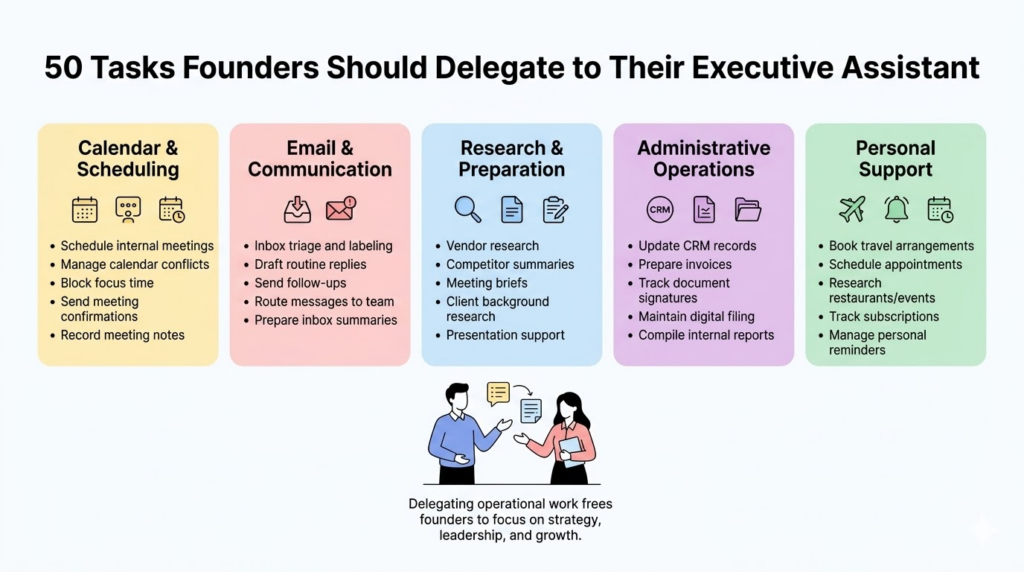
The mindset shift: your executive assistant multiplies Calendar and scheduling tasks
These are typically the first responsibilities founders hand off, because the time savings show up within days and the quality is easy to evaluate.
1. Schedule internal meetings:
The assistant books meetings with your team based on your availability, using calendar access and a set of rules you define once for what time blocks are open.
2. Coordinate external client calls:
Rather than back-and-forth emails to find a time, the assistant handles scheduling directly using a booking tool like Calendly. Delegation tip: give your assistant a booking link and specific instructions for which slots to offer different client types.
3. Manage calendar conflicts:
When two things land in the same slot, the assistant resolves the conflict based on priority rules you set in advance, rather than bringing every clash back to you.
4. Block time for focused work:
The assistant protects recurring blocks for deep work or preparation based on the weekly structure you want to maintain.
5. Send meeting confirmations:
Every scheduled meeting gets a confirmation sent 24 to 48 hours in advance as a standing routine, without prompting.
6. Schedule recurring meetings:
Standing team syncs, client check-ins, and partner calls are set up once and maintained by the assistant, including rescheduling when conflicts arise.
7. Coordinate travel calendars:
When you have travel days, the assistant blocks appropriate time, adjusts surrounding meetings, and flags anything that needs to move.
8. Prepare meeting agendas:
Before each meeting, the assistant drafts an agenda based on standing topics or prior notes and distributes it to attendees.
9. Send meeting reminders:
Participants who need a nudge get one. The assistant handles this as a scheduled task for any meeting above a certain duration or external attendee count.
10. Record meeting notes and follow-ups:
After meetings flagged for documentation, the assistant summarizes decisions, action items, and owners, then distributes the notes and tracks what is still open.
Email and communication tasks
Harvard Business Review’s research on executive time management found that senior leaders spend an average of six hours per day on email. A significant portion of that time involves routine tasks a trained assistant can handle. Delegation tip for this category: start with shared inbox access and a weekly review of triage quality before giving full send access.
11. Inbox triage and labeling:
The assistant sorts incoming mail into categories (action required, FYI, newsletters, waiting for response) so you open your inbox to a prioritized view rather than a raw feed.
12. Draft routine replies:
Standard responses, acknowledgments, and information requests get drafted for your review or sent directly once you have established quality standards for each type.
13. Forward messages to the right team member:
Emails that belong to someone else on your team get redirected with appropriate context added.
14. Track unanswered emails:
The assistant flags messages that have gone more than a defined period without a response so nothing important falls through.
15. Send follow-up messages:
When you are waiting on a vendor, client, or colleague, the assistant sends a follow-up after the agreed window without you having to remember.
16. Organize newsletters and subscriptions:
Subscriptions that do not require daily attention get routed to a digest folder or unsubscribed, reducing inbox noise without losing useful information.
17. Monitor contact forms:
Inbound inquiries from your website get reviewed and routed appropriately rather than sitting unread.
18. Manage meeting request responses:
Inbound meeting requests that fit your schedule get accepted with a confirmation; requests that do not fit get a polite redirect to your booking link.
19. Maintain contact lists:
After calls, meetings, or introductions, the assistant updates your CRM or contact records with current information.
20. Prepare email summaries:
When you return from travel or a heavy meeting day, the assistant prepares a summary of what arrived and what requires your attention.
Research and preparation tasks
The International Association of Administrative Professionals (IAAP) identifies research support as one of the highest-value contributions an experienced assistant makes to an executive’s output. Founders typically spend significant time gathering context they could receive ready to use.
21. Research potential vendors:
When you need a new service provider, the assistant compiles options, pricing ranges, and key differences so you start with a short list rather than a blank page.
22. Compile competitor summaries:
Regular or on-demand competitor research gets packaged into a usable summary rather than requiring you to search and synthesize it yourself.
23. Prepare meeting briefs:
Before significant meetings, the assistant gathers relevant background on the person or company you are meeting: recent news, prior interactions, relevant context from your CRM.
24. Gather background information on clients:
Before calls with existing clients, the assistant pulls account history, recent communications, and open items so you walk in with full context.
25. Research speaking or media opportunities:
If you are building a public presence, the assistant identifies relevant conferences, podcasts, or industry events and prepares application materials.
26. Collect event logistics:
For events you attend, the assistant compiles venue details, attendee information if available, and relevant session notes.
27. Prepare travel itineraries:
Complete trip packages including flights, accommodation, ground transportation, and meeting schedules, organized into a single document.
28. Gather information for presentations:
When you are building a deck, the assistant pulls supporting data, statistics, or examples based on your outline.
29. Compile internal performance reports:
Weekly or monthly summaries assembled from your tools (CRM activity, revenue data, operational metrics) rather than requiring you to pull them manually.
30. Create short research summaries:
One to two page briefings on topics you need to understand quickly: a potential partner’s business, a market you are evaluating, or a regulatory question that needs context.
Administrative operations tasks
Administrative work is where founder time most visibly disappears. Forbes has documented that founders of small and mid-size businesses spend an average of 16 hours per week on administrative tasks that could be delegated. Delegation tip for this category: start with tasks that have a clear process you can document in writing, then hand off the process along with the task.
31. Update CRM records:
After calls, meetings, and email exchanges, the assistant updates contact and account records so your CRM reflects current status.
32. Prepare invoices or billing reminders:
Routine invoicing and payment follow-ups happen on schedule rather than when you remember.
33. Track document signatures:
Contracts, engagement letters, and agreements that need signatures get tracked and followed up until complete.
34. Maintain digital filing systems:
Documents get organized into the correct folders with consistent naming conventions so anything can be found in under two minutes.
35. Prepare internal reports:
Weekly or monthly summaries of team activity, pipeline status, or operational metrics get formatted and distributed without requiring you to compile them.
36. Coordinate onboarding paperwork:
New employee or contractor documentation gets collected, tracked, and filed rather than accumulating in a pile.
37. Schedule team check-ins:
Regular one-on-ones and team meetings are set and maintained by the assistant, with agendas prepared based on standing topics.
38. Maintain task boards:
Your project management tool gets updated with current task status, new assignments, and completed items rather than falling out of date.
39. Organize shared documents:
Shared drives and document libraries get maintained with consistent structure so team members can find what they need without asking you.
40. Track recurring operational tasks:
Anything that happens on a fixed schedule, from license renewals to quarterly filings, gets added to a master tracker and flagged before the deadline.
Personal and lifestyle support tasks
Some assistants also help founders manage personal logistics. Whether this makes sense depends on the role scope you define, but it is worth knowing which personal tasks consume time that would otherwise go toward work. Outsource Accelerator’s research on offshore staffing roles notes that personal task support is among the highest-satisfaction additions for founders who include it in scope from the start.
41. Book travel arrangements:
Flights, hotels, rental cars, and transfers for business and personal travel, organized to your preferences.
42. Schedule personal appointments:
Doctor visits, service appointments, and personal commitments that would otherwise require calls during the workday.
43. Research restaurants or events:
When you need a dinner reservation or a venue for a small gathering, the assistant prepares a short list of options with relevant details.
44. Manage family calendar coordination:
If your personal and family schedule interacts with your work calendar, the assistant coordinates the two so nothing gets double-booked.
45. Coordinate personal errands:
Research, booking, or coordination for personal tasks that can be handled remotely.
46. Order office supplies:
Regular resupply of consumables happens automatically based on usage rather than when you realize you have run out.
47. Plan small events or team dinners:
Venue research, reservations, and logistics coordination so you attend rather than arrange.
48. Track subscriptions:
Software, media, and service subscriptions get inventoried so you know what you are paying for and can cancel what is no longer in use.
49. Arrange transportation:
Ground transportation for airports, client meetings, or personal commitments gets booked rather than left to the last minute.
50. Manage reminders for personal tasks:
Birthdays, anniversaries, renewal dates, and recurring personal commitments get tracked and flagged at the right time.
How to start delegating these tasks
Do not hand off all 50 at once. Start by choosing five tasks from one category, document how you currently handle each one, and walk your assistant through the process once. The full framework on how to manage an executive assistant covers what to document, how to review early work, and when to expand scope.
The general principle: the tasks you delegate first should have clear quality standards and short feedback loops. Calendar management and inbox triage work well because you can see the output every day and give specific feedback quickly. Research projects work less well as first delegation tasks because the quality signal is slower and more subjective.
Delegation works best when trust is visible
The reason founders often stall at low utilization is not that they lack tasks to delegate. It is that they cannot see enough of the assistant’s work to feel confident expanding the scope. Building that visibility requires a communication structure.
The uilding trust with remote EA framework covers the specific practices that make delegation feel less risky: shared task tracking, documented workflows, and defined check-in points. A structured executive assistant weekly check-in creates a regular moment to review what is working and what is ready to expand. The executive assistant 30-60-90 plan maps the full progression from initial task set through independent workflow ownership across the first quarter.
Understanding executive assistant costs
As delegation expands and the role’s value becomes clearer, many founders compare offshore and domestic hiring options. The offshore executive assistant rates vs US comparison covers total cost differences across engagement types, and the executive assistant salary Philippines guide covers compensation and skill levels for offshore roles specifically.
Most founders already know they should delegate more. The challenge is deciding what to hand off first. Use this list as your starting inventory. Choose five tasks from one category, document your current process for each, and walk your assistant through it. When those five are running without your involvement, add five more. Schedule a conversation with our team if you want help identifying which tasks from your specific workflow would create the most immediate relief.
FAQs about Founders Tasks Delegation to EA
Start with calendar management, inbox triage, and meeting coordination; these have clear quality standards and fast feedback loops that build confidence before expanding to higher-judgment tasks.
A full-time EA can typically manage 30 to 50 ongoing responsibilities; the practical limit is usually the founder’s capacity to document and transfer the tasks, not the assistant’s capacity to handle them.
Yes, when personal task support is defined as part of the role from the start; clear scope documentation ensures both parties understand what is included.
If your assistant consistently completes all assigned work before the week ends and waits for direction, the task inventory needs to expand; this list is a practical starting point.
Most procedural tasks transfer within one to two weeks with a documented process and one review cycle; judgment-heavy tasks like client communication may take four to eight weeks.